How to Create Podcast Audiograms for Social Media
A practical guide to turning podcast audio into animated waveform videos that actually get clicks on Instagram, TikTok, and LinkedIn.
February 15, 2026. 7 min read
You spend hours recording and editing your podcast. Then you post a static image on Instagram with “new episode out!” and get maybe three likes from your mom and two spam bots.
There’s a better way.
What Are Audiograms?
An audiogram is basically a short video clip of your podcast audio with a waveform visualization dancing along. Usually includes the episode artwork, maybe a transcript snippet, and that satisfying animated waveform that moves with the audio.
They work because they solve the fundamental problem of promoting audio content on platforms built for video. People scrolling Instagram can’t listen to a 60-minute podcast episode right then. But they can watch 30 seconds of your best moment with subtitles and decide if they want to hear more.
The waveform gives visual feedback that something’s happening. It’s oddly mesmerizing. And when you add captions, people can watch with sound off—which is how most social media gets consumed anyway.
Why Audiograms Actually Work
The difference in engagement between a static post and an audiogram is real. A boring “new episode!” image gets scrolled past. The same content as an audiogram with a good hook? Way more engagement.
Here’s why they work:
They stop the scroll. Movement catches attention. A bouncing waveform is enough to make someone pause for half a second, which is all you need.
They work with sound off. Add captions and you’ve got a complete message that works in any context—on the train, in bed, sneaking a social media break at work.
They prove it’s worth listening to. You’re showing, not telling. Instead of “great conversation about marketing,” they hear 30 seconds of actual great conversation about marketing.
They’re native to the platform. Social algorithms love video. They especially love video that keeps people watching. An audiogram with a strong hook can do exactly that.
Platform-Specific Best Practices
Each platform has its own vibe, and your audiograms need to match it.
Instagram Stories and Reels
Aspect ratio: 9:16 (vertical)
Stories are made for quick, casual content. Keep it under 15 seconds. Use a hook that makes people want to hear more, then drive them to the link in bio.
For Reels, you can go up to 90 seconds, but honestly 30-45 is the sweet spot. Reels are discovery engines—you want something punchy that makes strangers hit follow.
Add text overlays. Make them big and readable on a phone. Use colors that pop against your background.
TikTok
Aspect ratio: 9:16 (vertical)
TikTok is all about authentic, fast-paced content. Don’t try to make it look polished. The raw, real vibe works better.
Keep it under 60 seconds. Start with the hook in the first three seconds or people will swipe. The algorithm is ruthless.
Captions are mandatory. But don’t just transcribe—edit for clarity and add line breaks so it’s easy to read quickly.
YouTube Shorts
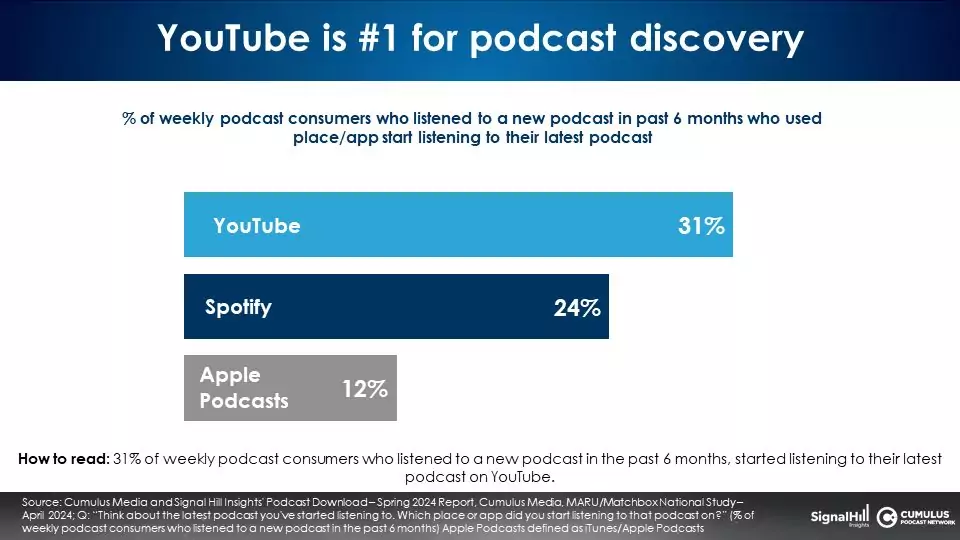
Aspect ratio: 9:16 (vertical)
YouTube Shorts can be up to 60 seconds. They work similarly to TikTok, but the audience skews slightly older and tends to prefer more substantial content.
You can get away with being a bit more educational here. A 45-second clip explaining a concept from your episode can do really well.
Make sure your thumbnail frame (first frame) is compelling. People browse Shorts in a grid view too.
Aspect ratio: 1:1 (square) or 16:9 (landscape)
LinkedIn is the weird one. Video does well, but the professional context matters.
Keep it educational or insightful. Save the banter and jokes for Instagram. LinkedIn wants to know what they’ll learn.
You can go longer here—60-90 seconds is fine if the content justifies it. The LinkedIn algorithm actually rewards watch time.
Add a text description that provides context. LinkedIn users often browse with sound off, and they want to know why they should invest time watching.
Twitter/X
Aspect ratio: 1:1 (square) or 16:9 (landscape)
Twitter video is hit or miss, but when it hits, it spreads fast.
Keep it short. 30 seconds max. Twitter users have the attention span of a caffeinated hummingbird.
The key is making it controversial or insightful enough to quote tweet. If people are arguing about your clip in the replies, you’ve won.
Making Audiograms That Actually Get Engagement
Here’s what actually matters when making audiograms that get engagement.
Start with a hook
The first three seconds determine everything. If you don’t hook attention immediately, nothing else matters.
Don’t start with “So, um, I think…” Start with the moment someone says something surprising, funny, or controversial. Jump straight to the good part.
Captions are non-negotiable
Most people watch social media with sound off. If your audiogram requires sound to make sense, you’ve lost 80% of your audience.
Make captions big, easy to read, and well-timed. Edit them for clarity—clean up the ums and ahs.
Keep it tight
Every second counts. If a word doesn’t add value, cut it. If there’s a long pause, tighten it up — our free podcast silence remover can do this automatically, right in the browser.
Your goal isn’t to show the full conversation. It’s to show the best 30 seconds that make people want to hear the full conversation.
Design matters, but not as much as you think
A clean, simple design beats an overproduced one. People can smell try-hard energy from a mile away.
Use your podcast artwork. Add a waveform. Add captions. That’s usually enough.
Don’t go crazy with transitions and effects. This isn’t a movie trailer.
Test different content types
Not every audiogram needs to be a profound insight. Mix it up:
- Funny moments from the conversation
- Surprising statistics or facts
- Controversial takes that spark discussion
- Practical tips people can use immediately
- Behind-the-scenes moments or bloopers
See what your audience responds to. Double down on what works.
The Practical Part: Making Them
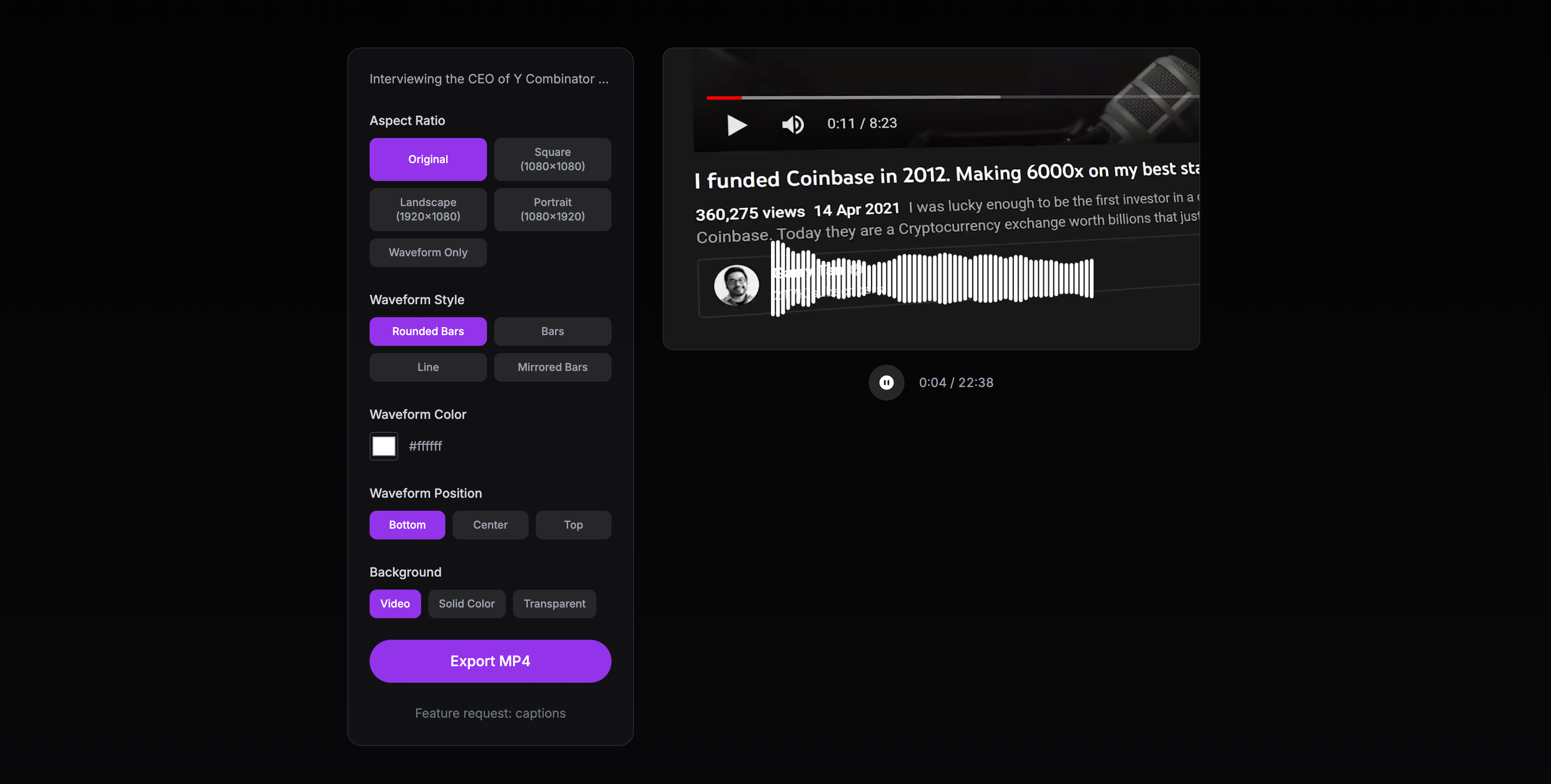
You’ve got options.
You can use dedicated audiogram tools—there are plenty. Some are free, some charge monthly. Most are pretty good at the basics. We compared the main ones in best podcast audiogram makers.
You can edit them manually in video editing software if you want full control. Takes longer but you get exactly what you want.
Or you can use something like our free podcast audiogram maker that handles the technical stuff so you can focus on picking good clips.
Whatever tool you use, the process is basically the same:
- Pick your best 30-60 second clip
- Add your podcast artwork
- Generate the waveform animation
- Add captions (auto-generated is fine, just proofread them)
- Export in the right dimensions for your platform
- Post and see what happens
The Real Secret

Here’s what nobody tells you: making audiograms isn’t the hard part. Picking good clips is the hard part.
You need to develop an instinct for what will work. What made you laugh while editing might not land on social media. What seemed profound in context might fall flat as a 30-second clip.
The only way to get good at this is to make a bunch and see what works. Post consistently. Pay attention to what gets engagement. Adjust.
Most podcasters give up after making five audiograms that don’t go viral. But this isn’t about going viral. It’s about building a library of shareable moments that gradually expand your audience.
Make one for every episode. Post them throughout the week. Some will do better than others. The ones that hit will bring new listeners. The ones that don’t will at least remind your existing audience that you exist.
That’s the game.
If you want to make this easier, we built a free tool that turns podcast audio into audiograms in about two minutes. It generates captions automatically with speaker detection—all in your browser. No watermarks, no sign-up required. Just upload your clip and download the video.
But whatever tool you use, the principles are the same: start with a hook, keep it tight, add captions, and ship it. The best audiogram is the one you actually finish and post.